WORKSPACE SOLUTIONS
What are collaborative workspaces? Types, examples and how to design one

WeWork Staff
October 27, 2026
Summarize this article with AI
Collaborative workspaces explained: the main types, real examples, benefits and challenges, and how to design one that works for your team.
TL;DR
- A collaborative workspace is a physical or digital environment built to help people work together, share ideas and solve problems
- The main physical types run from huddle rooms and meeting rooms through to breakout lounges, open team tables and event spaces
- The right mix lifts productivity, engagement and decision speed, mainly because teams stop losing time hunting for a room that fits
- The main challenge is balancing open collaboration areas against quiet zones for focused work to survive the noise from next door
- Design starts by mapping how your teams already work, then matching room sizes, noise zoning and booking systems to that pattern
Collaborative workspaces are physical or digital environments designed to help people exchange ideas, solve problems and make decisions together. Physical layouts can support productive discussion or create noise, interruptions and competition for rooms.
Teams need different settings for quick check-ins, project work and larger meetings. One open area rarely supports every task, group size or need for privacy.
This guide covers physical workspace types, what makes them effective and how to design the right mix for your office. Learn which types suit your team, what features make them effective and how to balance collaboration with focused work.
What is a collaborative workspace?
A collaborative workspace is a physical or digital environment designed to help people work together, share ideas and solve problems. In an office, that means any area purpose-built for group interaction. It could be bookable meeting rooms, breakout lounges, open team tables, and similar zones. A collaborative workspace, however, differs from a desk built for solo, heads-down work.
The term also covers digital collaboration platforms. For this article, we will scope our discussion to physical office spaces only. Browse the WeWork India coworking solutions for shared workspace options that include collaborative areas by design.
Physical vs digital collaborative workspaces
The split comes down to where the work happens, and to what each setup handles well.
| Factor | Physical | Digital |
|---|---|---|
| Where collaboration happens | Office zones, meeting rooms, lounges | Shared online platforms and whiteboards |
| Typical tools | Whiteboards, screens, furniture | Chat, video calls, shared documents |
| Best for | In-person brainstorming and team building | Distributed and hybrid teams |
Hybrid teams usually need both a physical space for in-person days and a digital layer to carry collaboration between them. WeWork India’s workplace software connects room and desk booking across the two.
Key features of a collaborative workspace
Flexible layout and built-in technology separate a collaborative space from a plain open floor plan.
- Flexible layouts: furniture and partitions move to suit different group sizes and activities
- Integrated technology: screens, video conferencing and booking sit in the room ready to use
- Focus and breakout zones: quiet areas sit beside group spaces, so concentration survives the noise
- Bookable rooms of different sizes: a two-person huddle room and a 20-seat conference room serve different meetings
- Comfortable shared amenities: seating and lighting hold up through a two-hour working session
Types of collaborative workspaces
Each format is built for a particular group size and a particular kind of work.
| Type | Group size | Typical equipment | Best for |
|---|---|---|---|
| Conference and meeting rooms | 4 to 20+ | Screen, video conferencing, whiteboard | Formal meetings, presentations |
| Huddle rooms | 2 to 4 | Small screen, basic video setup | Quick syncs, one-on-ones |
| Breakout areas and lounges | 2 to 8 | Informal seating | Casual discussion, relaxed catch-ups |
| Open team tables and project zones | 4 to 15 | Shared desks, power outlets | Ongoing project work |
| Brainstorming and innovation rooms | 3 to 10 | Whiteboards, sticky-note walls | Ideation sessions |
| Event spaces and amphitheatres | 20+ | Stage or tiered seating, AV | Town halls, large presentations |
1. Conference and meeting rooms
Conference and meeting rooms are formal, bookable spaces equipped for presentations and structured discussions.
Best for: client meetings, interviews and scheduled team reviews.
For a closer look at room formats and sizes, see the types of conference rooms guide.
2. Huddle rooms
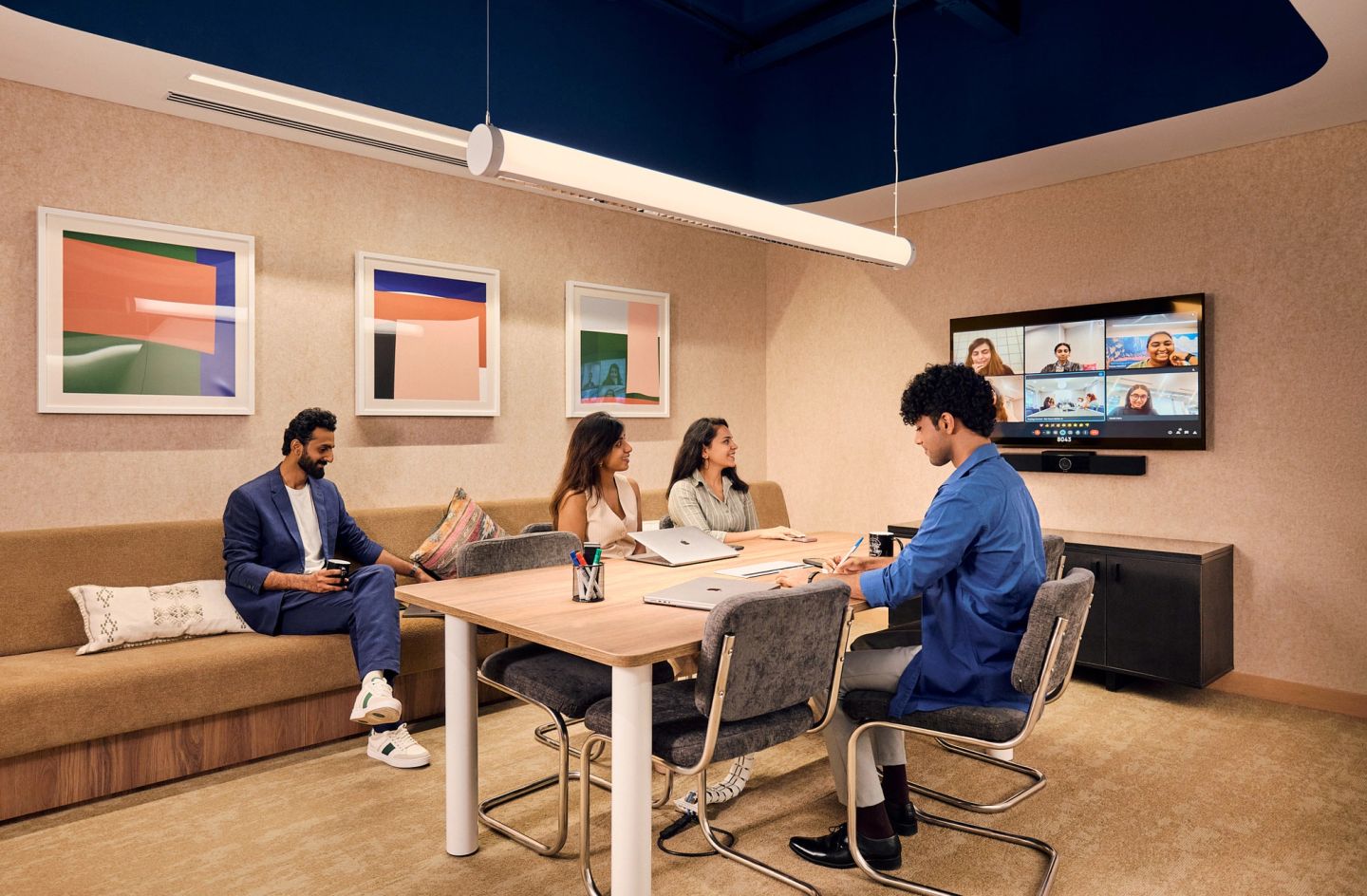
Huddle rooms are small, enclosed spaces for two to four people, built for quick syncs instead of formal meetings.
Best for: one-on-ones, short video calls and ad hoc check-ins.
3. Breakout areas and lounges
Breakout areas and lounges are informal seating zones outside the main workspace, designed for relaxed conversation.
Best for: coffee chats and short mental breaks between focused work.
4. Open team tables and project zones
Open team tables and project zones are shared desk clusters where a project team sits together for an extended period.
Best for: teams who need to stay in easy earshot of each other.
5. Brainstorming and innovation rooms
Brainstorming and innovation rooms carry whiteboards and visual aids built for generating and mapping ideas.
Best for: ideation sessions, design sprints and early-stage planning.
6. Event spaces and amphitheatres
Event spaces and amphitheatres are larger venues built for gatherings beyond a single team.
Best for: town halls, large presentations and company-wide events.
Collaborative workspace examples
Collaborative workspaces show up in several settings beyond a single company's own floor.
- Coworking spaces, where shared meeting rooms and lounges bring together people from different companies
- Enterprise offices and GCC campuses, where large teams mix meeting rooms with open project zones
- Innovation hubs and incubators, which pair workspace with structured founder support
- On-demand meeting rooms, booked by the hour for a single session
These are settings, distinct from the room formats above. One coworking space may hold huddle rooms and conference rooms under the same roof.
Quick test: is your office actually collaborative?
- Can a team of three find a free room within five minutes?
- Does every room run a video call without an adapter hunt?
- Is there a quiet zone within 20 steps of the busiest lounge?
- Can anyone see room availability without asking the front desk?
Benefits of collaborative workspaces
A good mix of spaces shows up in how fast teams settle questions, and in how often people talk outside their own team.
1. Increases productivity
Teams lose time when the right room is busy. Gensler's Global Workplace Survey 2026, covering more than 16,400 office workers across 16 countries, found that 43% have cancelled a meeting outright because no room was available. A properly sized room mix removes that failure point, and the session happens as planned.
2. Boosts employee engagement
Spaces built for interaction give employees natural openings to connect with colleagues outside their immediate team. A shared lounge puts two project teams in the same queue for coffee. Those unscheduled conversations are the ones that rarely survive a calendar-only culture.
3. Enhances creativity and innovation
Rooms with whiteboards and flexible seating let ideas build on each other while people are still in the room. A design sprint needs wall space more than it needs a boardroom table. Giving ideation its own room keeps half-finished thinking visible between sessions.
4. Improves communication and teamwork
Easy access to huddle rooms settles quick alignment in one session. Without them, conversations spill into corridors: the same Gensler 2026 survey found 64% of workers take calls in hallways for lack of an appropriate space. Enclosed two to four person rooms absorb most of that traffic.
5. Provides flexibility
A mix of room types lets teams pick the setting that fits the task, from a 15-minute huddle to a client presentation. The same team uses three different spaces in a day. One all-purpose meeting room forces every activity into the same shape.
6. Optimises office space
Thoughtful space planning gets more functional use out of the same square footage. Replacing one oversized boardroom with three huddle rooms usually serves more meetings per week. Rivet by WeWork India designs offices with this kind of space mix built in from the start.
7. Faster decisions
Questions that bounce across three days of messages often close in a 20-minute room session. Having a free room on the day is what makes that possible. Decision speed is the clearest signal that the room mix is working.
8. Greater team agility
Bookable, reconfigurable spaces let teams change how they work as projects shift. A squad formed for one quarter takes an open team table, then releases it. Fixed, assigned rooms make the same change as a facilities request.
Challenges of collaborative workspaces
Noise and room scarcity surface first. Each has a practical fix, and each gets worse when nobody manages it.
- Noise: open collaborative areas carry into nearby desks. Phone booths and dedicated quiet zones give focused workers somewhere to go.
- Lack of privacy for focused work: shared spaces suit group work, while confidential calls need a closed room. Keep a few small enclosed rooms unbookable for walk-up use.
- Distractions: foot traffic near collaborative zones pulls attention from solo tasks. Zoning puts focus desks away from the pantry and the lounge.
- Overbooked rooms: popular rooms go fast at peak hours. A clear booking system with auto-release on no-shows returns most of that capacity.
Also read: How to stay focused in a coworking space
How to design a collaborative workspace
Designing a collaborative office space starts with how your teams already work, then matches the room mix to that pattern.
- Understand how your teams work: note which tasks need a group and which need silence.
- Mix space types across the office: several formats beat one all-purpose room.
- Plan zones for noise: keep loud collaborative areas away from focus desks.
- Integrate meeting technology: every room should handle a video call without a setup scramble.
- Make rooms bookable: a clear system stops double bookings and standing reservations.
- Review usage data: adjust the room mix as booking data shows what gets used.
For teams building collaboration zones into their own office from the ground up, Rivet offers end-to-end design and build.
Zoning rule of thumb
- Loud zones such as lounges and event space along one edge of the floor
- Huddle rooms and phone booths as the buffer layer
- Focus desks furthest from the pantry and reception
- Review booking data each quarter and move the mix where demand shows
Collaborative workspaces at WeWork India
WeWork India centres offer bookable meeting rooms, shared lounges, and open coworking areas, so teams get collaborative office space without designing it first. All Access adds multi-location entry for distributed teams, and workplace booking software covers rooms and desks across 8 cities as of 30 June 2026.
Also read: All Access Plus vs Pay Per Use
Conclusion
A collaborative workspace is a physical or digital environment built to help people work together, and the room mix matters as much as having collaborative space at all. Teams do best when group zones are balanced against quiet areas for focused work. Browse WeWork India's meeting rooms and coworking options to build that balance into your own office.
Frequently asked questions
1. What does "collaborative workplace" mean?
A collaborative workplace usually describes a culture of open communication and teamwork, more than a physical space. It refers to how a team works together, while a collaborative workspace refers to the physical or digital environment that supports that culture. The two travel together in practice.
2. Can you provide some examples of collaborative workspaces?
Common examples include coworking spaces, enterprise offices with dedicated meeting and huddle rooms, innovation hubs and incubators, and on-demand meeting rooms booked by the hour. See the collaborative workspaces examples section above for what each setting looks like in practice.
3. Is a coworking space a collaborative workspace?
A coworking space often contains collaborative workspaces, such as shared meeting rooms, huddle rooms and lounges, though the two terms are separate. Coworking describes the overall shared-office model, while collaborative workspace describes a specific type of space sitting within it.
4. What is the difference between a collaborative workspace and an open office?
An open office describes a floor plan with minimal walls. A collaborative workspace is purpose-built for group interaction and may include closed rooms such as huddle spaces. An open office turns collaborative only once it adds the technology, zoning and bookable rooms that make collaboration work.
5. How do you book a collaborative space for a team meeting?
Most offices and coworking providers use a booking system, either an app or a front-desk request, to reserve meeting rooms and huddle spaces in advance. At WeWork India, members book meeting rooms through the Meeting Rooms page or the membership app, with availability visible before they walk over.
Related Blogs:
WORKSPACE SOLUTIONS
A workspace is not just about the work. It is also about providing employees a space that allows them the freedom to work where, when, and how they want. Flexibility...
WORKSPACE SOLUTIONS
A virtual office gives your business a premium address, GST compliance, and meeting room access — without the cost of a physical lease.
WORKSPACE SOLUTIONS
Your office is the one brand touchpoint clients, candidates, and your own team experience every single day — here's how to design it on purpose.